Making a PPT is not an exam — it’s a communication tool. Weekends are for resting, so don’t waste your time tweaking font sizes and alignment.
When it comes to making PPTs, four types of people suffer the most —
Type 1: People in admin, HR, finance, or customer service roles. Your daily work is processing reimbursements, scheduling meetings, handling onboarding and offboarding, and replying to emails. When the company asks you for a monthly, quarterly, or half-year report, you stare at a blank PPT and can’t figure out where your “milestones” or “standout achievements” are. You have to write something, but you don’t know what to write.
Type 2: You’re swamped and you’ve definitely done a lot of work — your traces are all over chat logs, meeting minutes, email threads, and work ledgers. But who has time to groom all that into a presentable PPT? So you end up rearranging layouts on a Sunday afternoon when you should be resting.
Type 3: You know the content in your head, but the moment you open PowerPoint you freeze. You browse template sites for a while, and all the good ones require a membership — Docer costs 39 yuan, Gaoding Design costs 29 yuan. Not expensive, but once you buy one, you find out a colleague is using the exact same template. Awkward. If you try to lay it out yourself, you’re not a designer — after fiddling with alignment it’s still crooked, and your color scheme looks like a Spring Festival Gala stage.
Type 4: The most wronged type — you’re suddenly told you need to give a share-out. Your boss says “At next week’s team meeting, tell everyone about XX.” You say yes out loud, but inside you’re panicking. You have the materials: policy documents, process docs, work notes, data reports… but these are “for your own reference,” not “for telling others.” How do you open? How do you connect it all? How deep should you go? What goes on the first slide? You have no idea.
Today, we’ll solve all four of these pains with one free tool — Doubao AI. Kimi PPT Assistant works too, but its free version often makes you wait in queue, frequently showing “too many users, please try again later,” so the generation experience is unstable. That’s why I’ll focus on Doubao below, and only mention Kimi when you need to upload long documents (over 20,000 characters) to organize materials.
No special skills needed — just read on and follow along.
🛠️ Tools Overview
You only need two tools:
Doubao AI (by ByteDance)
- Website: https://www.doubao.com (web / App)
- Free quota: Free, unlimited uses
- Best for: Most workplace reporting scenarios — monthly reports, weekly reports, year-end summaries, performance reviews, etc.
Kimi PPT Assistant (by Moonshot AI)
- Website: https://kimi.moonshot.cn (web), just type
@PPT助手 - Free quota: 3 free uses per month
- Best for: Scenarios that require processing large amounts of text (e.g., digesting thick policy documents, training manuals, or work reports). It can upload documents (reads 20,000 characters at once) and turn your materials directly into a PPT.
- ⚠️ Note: Kimi’s free version often requires queuing during peak hours, frequently showing “too many users are currently using it.” Generating a single PPT can take a long time or even fail. If you’re in a hurry and don’t want to wait, use Doubao first.
📖 Scenario Deep Dives
Scenario 1: Admin/HR/Finance support roles — nothing to write about, how do you deliver?
If you’re in admin, HR, finance, customer service, or similar roles, your day-to-day doesn’t involve “closing a major client” or “completing a big project.” Your work is reimbursement forms, scheduling meetings, handling onboarding, and replying to emails.
No standout data? Doesn’t matter. Your goal isn’t to blow everyone away — it’s to deliver without embarrassment.
Use Doubao AI, done in three steps (completely free)
Step 1: Open Doubao and find the PPT generation entry
Visit doubao.com or open the app, find “PPT生成” (PPT Generation) above the input box, and click in.
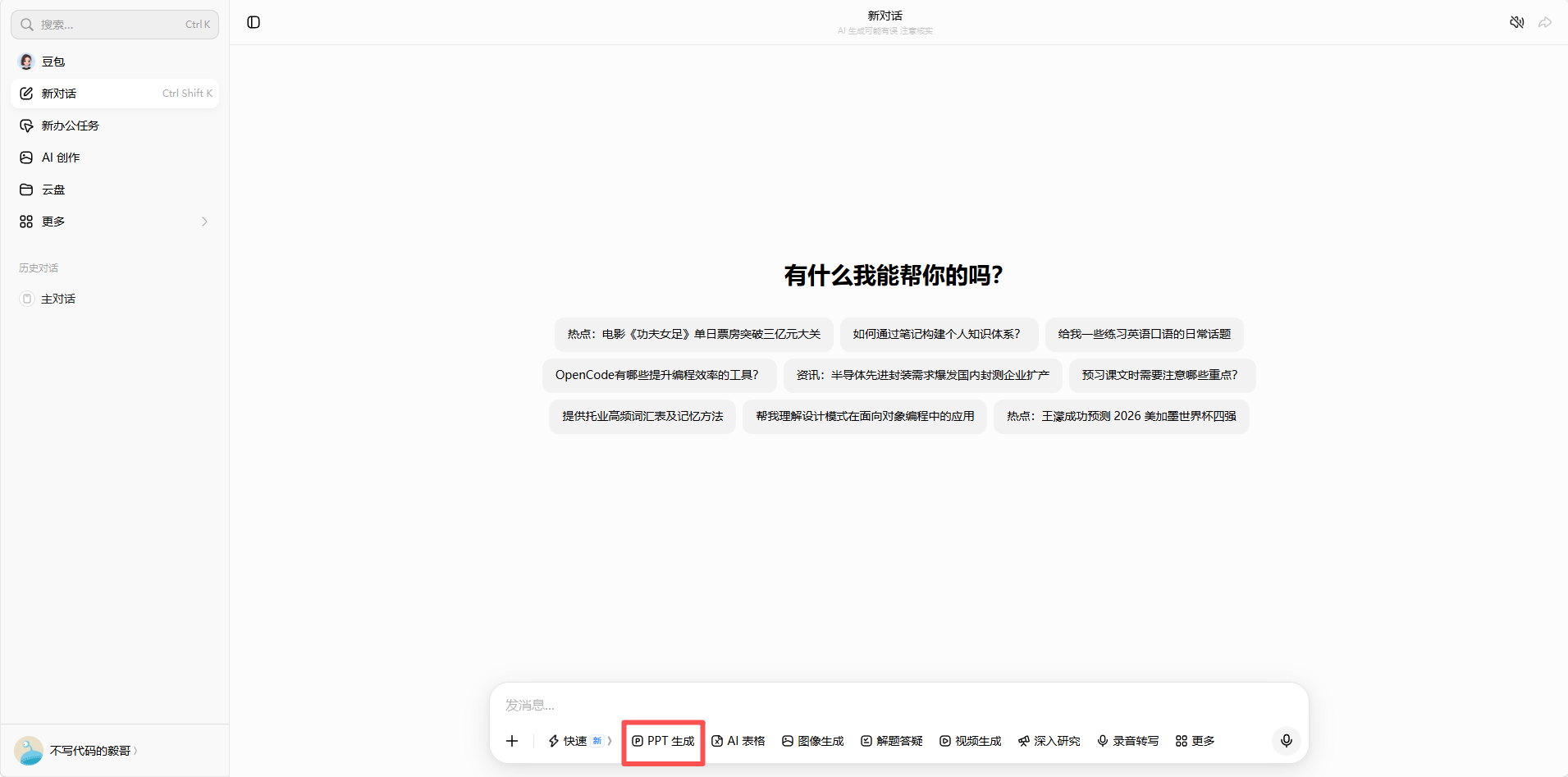
Location: Doubao main interface → click the PPT Generation entry
Step 2: Pour everything you can think of into it, and the PPT comes out directly
No need to organize your language or list any highlight achievements. Just list what you actually did this month/quarter — the more casual the better. For example:
1 | Help me make a June admin work monthly report PPT. |
See? No metrics needed, no quantification, no packaging. Just list things honestly. AI will turn all this into a “structured report” for you.
Hit generate, and the PPT comes out. No need to confirm an outline or pick a template — Doubao does it all in one step.
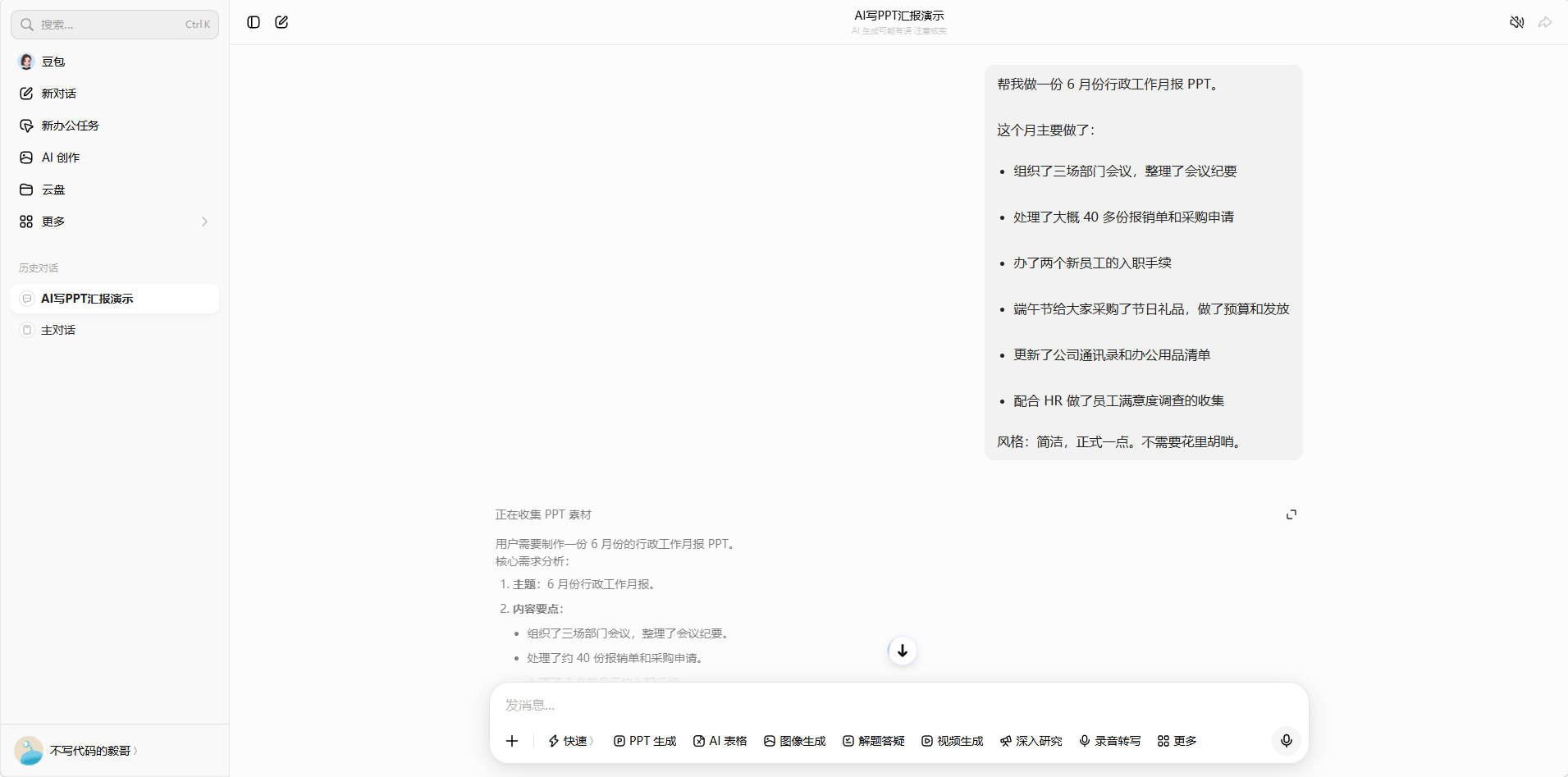
Location: Doubao input box + the generated PPT result
Step 3: Download, fine-tune, and deliver
Download the .pptx file. Check for anything obviously off, fix department names, and you’re done.
Screenshot location: Download button
Key takeaway: You don’t need to fabricate any “highlights.” AI’s role is to help you package what you did into a presentable framework. What your leader wants is a complete document — nobody is closely scrutinizing your monthly report.
Scenario 2: Swamped with work — you have stuff but no time to organize it?
If you’re doing things every day and your work results are scattered across chat logs, meeting minutes, email threads, and work ledgers — what you need is someone to help you assemble all those fragments into a PPT.
First choice: Doubao AI (free, unlimited), with Kimi as backup
Step 1: First, organize your “material pack”
No need to write a formal document. Just casually collect the following:
- Important items you’ve been involved in during this period (even just listing the names)
- A few things you think are worth mentioning (one sentence each is fine)
- If you have data, write the numbers; if not, write the general status
Like this:
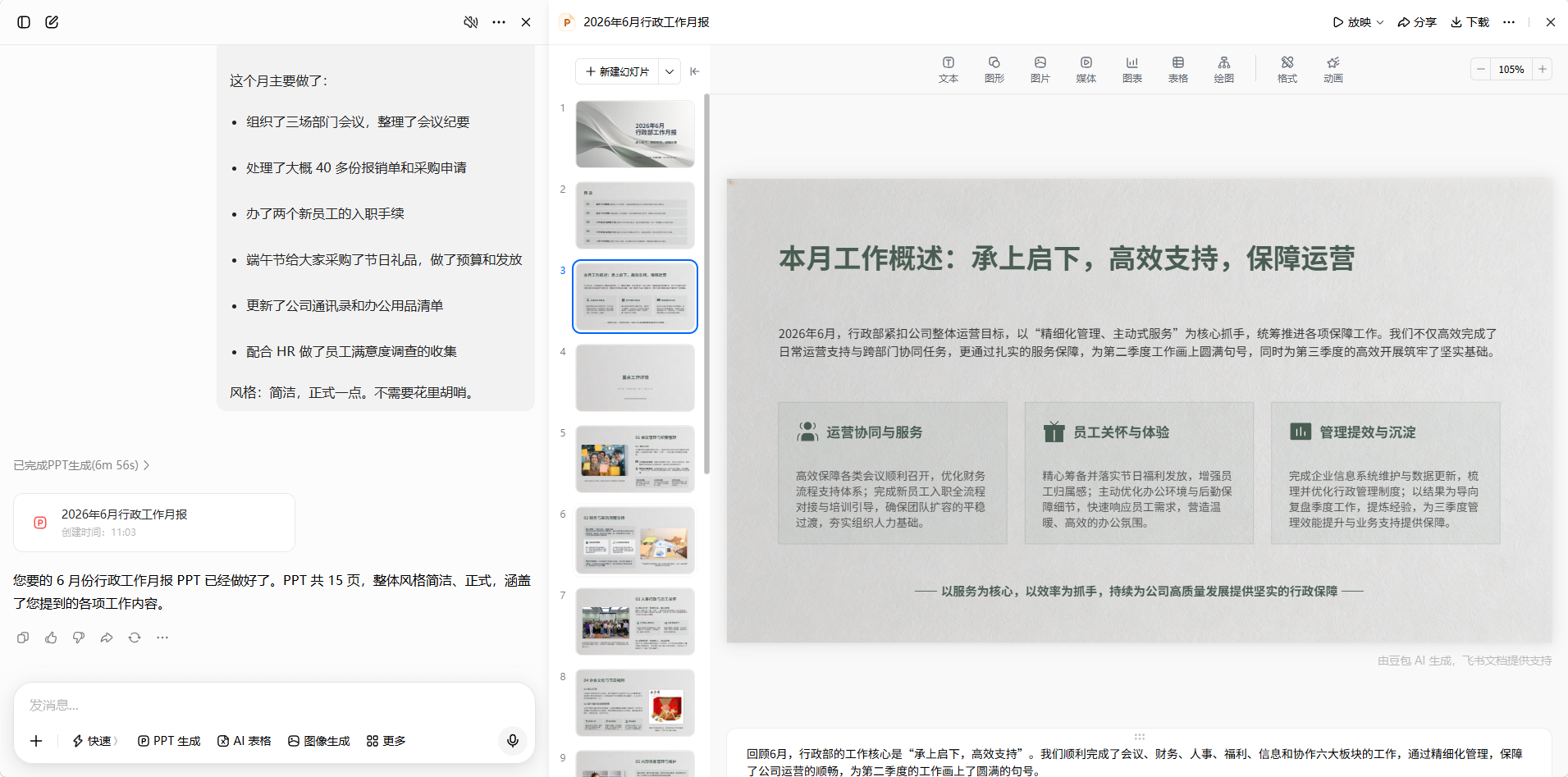
1 | Here's what I did in Q2: |
Step 2: Open Doubao, find the PPT generation entry, and feed in the materials
Same as Scenario 1 — visit doubao.com or find “PPT生成” in the app, then send the materials above along with your requirements:
1 | Help me make a Q2 work summary PPT. Background: |
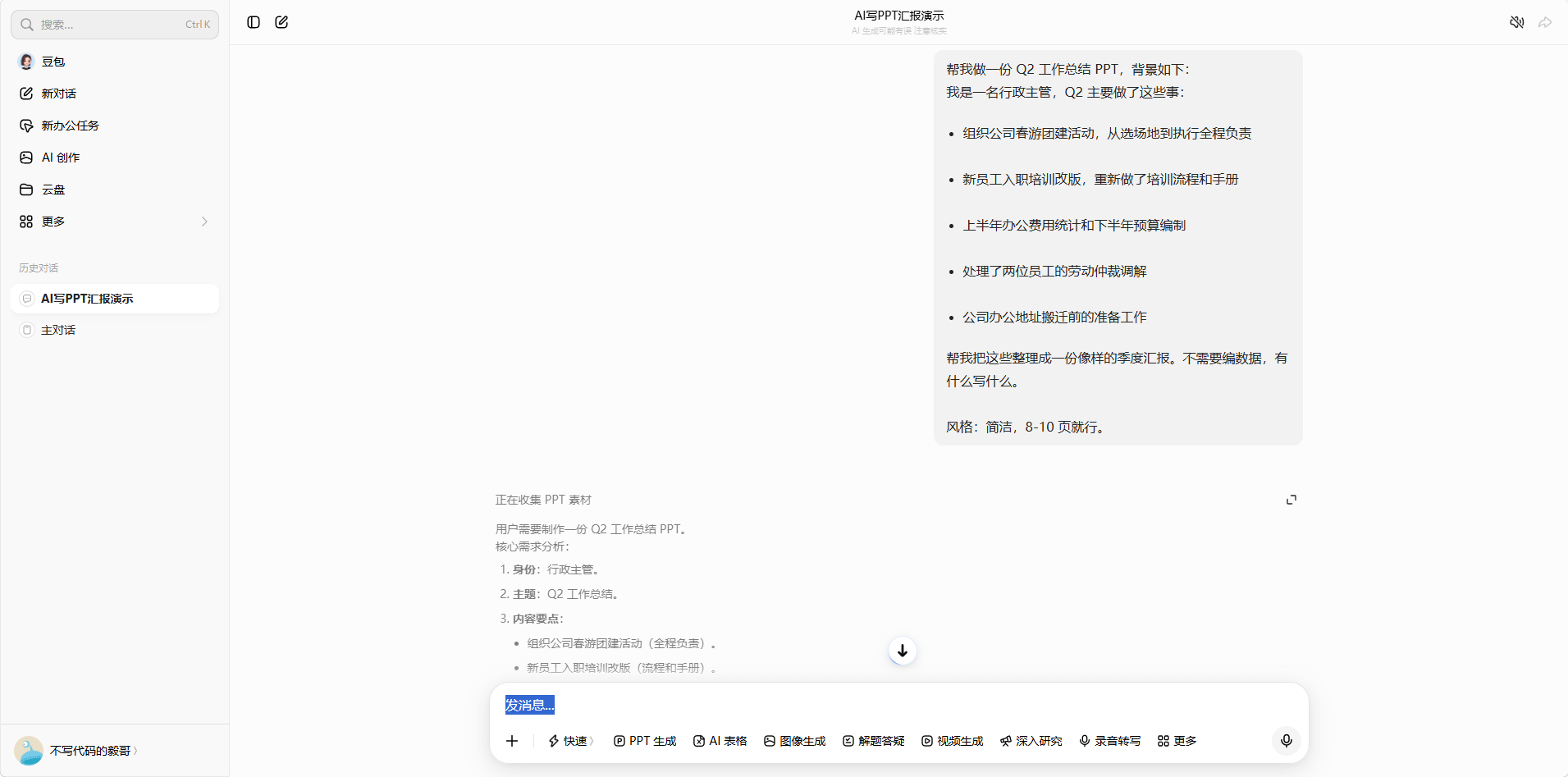
Location: Doubao input with materials + the generated PPT result
Step 3: Download and fine-tune
The PPT is done — download it directly. No outline confirmation, no template selection — Doubao handles it end-to-end.
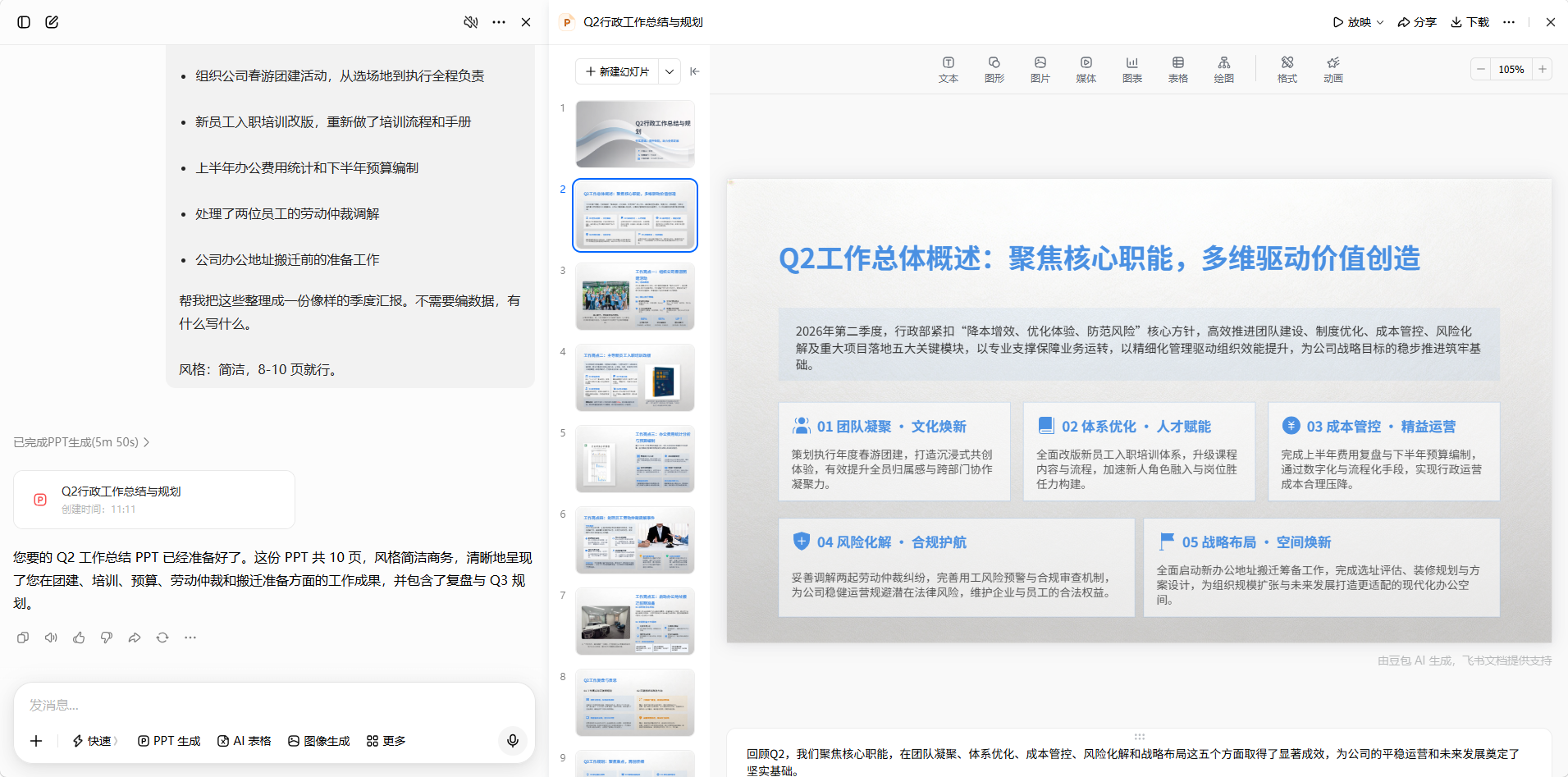
Location: Doubao PPT generation + download
Advanced tip: If you have documents like meeting minutes or weekly reports, you can upload them directly to Doubao and let it extract the key points before generating the PPT — skipping the material organization step entirely.
🔄 Kimi backup: If you’re not satisfied with Doubao’s output, try Kimi PPT Assistant (kimi.moonshot.cn, type
@PPT助手), which offers 3 free uses per month. But note that Kimi’s free version often requires queuing, and you might wait a long time during peak hours.
Scenario 3: Can’t design, don’t want to buy templates? Just tell AI what you want it to look like
Have you had this experience — you’ve figured out the content, but opening PPT gives you a blank canvas. You browse template sites for an hour or two, and the ones you like all cost money, while the free ones are either ugly or overused. You finally download a template, only to find at the meeting that a colleague from the next team is using the exact same one.
Actually, you don’t need design skills. You just need to be able to describe what you want it to look like.
Doubao works fine — the key is the “style description”
Step 1: While entering your content, also describe the design style you want.
No need to use design jargon. Just describe based on your aesthetic intuition. For example:
1 | Help me make an annual training plan PPT about building the company's internal training system for the second half of the year. |
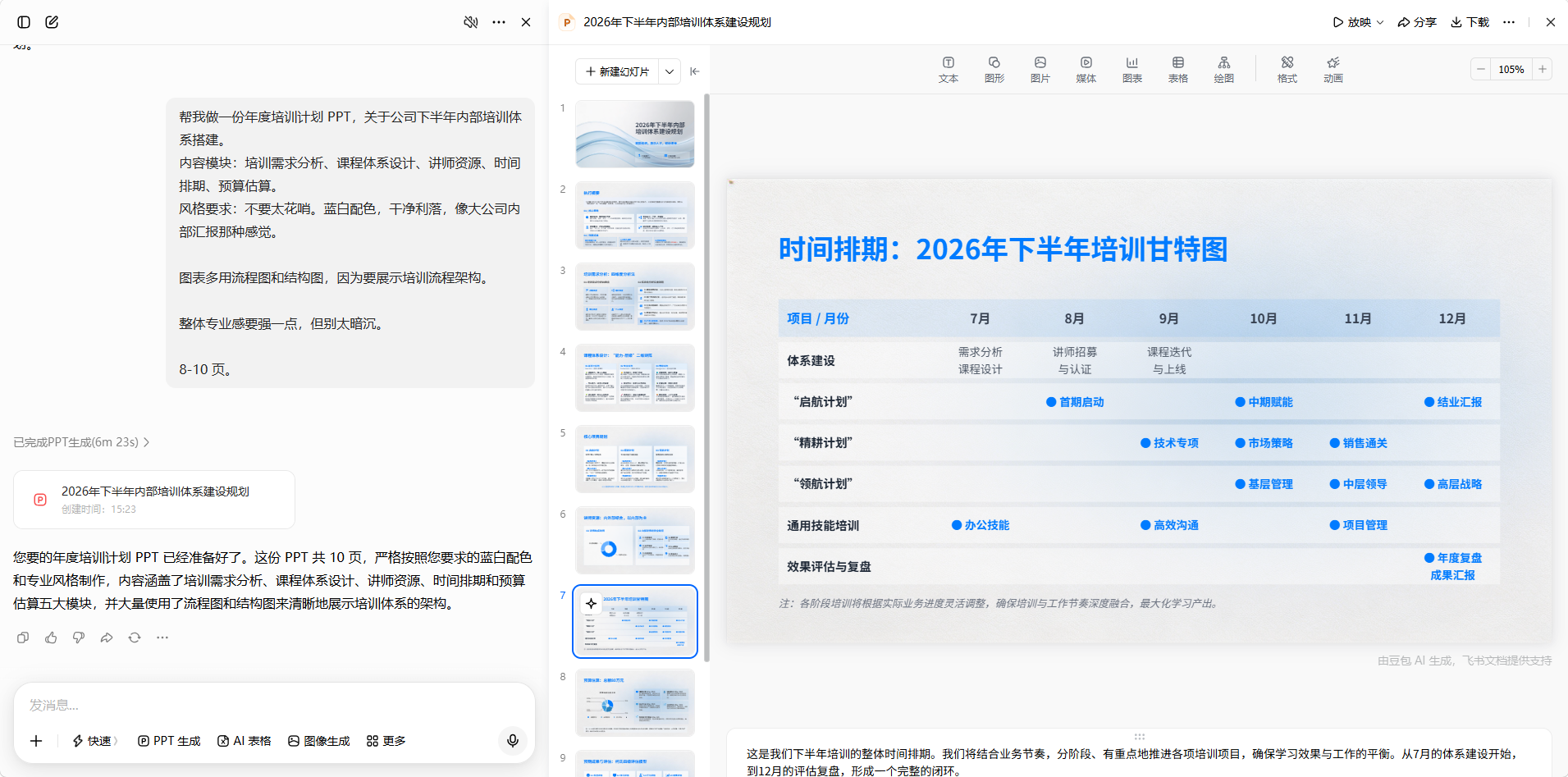
Location: Doubao input box, style description + generated PPT result
Step 2: The PPT generates directly — if you’re not satisfied, swap a few words and try again
You’ll find that the colors, fonts, and chart styles AI generates are basically in the direction you described. Not satisfied? Just change a few words and describe it again — it’s free anyway.
Step 3: Fine-tune after downloading, and you’ve got a one-of-a-kind PPT.
Because your style description is unique, the template AI puts together is also unique — no risk of clashing with someone else’s template.
Common Style Keywords (copy directly)
Don’t want to rack your brain figuring out how to describe it? Pick any combination from below:
| Report Type | Recommended Style Description |
|---|---|
| Internal Business Report | Blue-white color scheme, business-minimalist, data-chart-focused, clean and sharp |
| Performance Review / Promotion Defense | Deep blue with gold accents, professional and grand, highlight personal contributions, not too many animations |
| Government / Public Sector Report | Red-gold color scheme, solemn and formal, clear structure (background → measures → results → next steps), 8-12 pages |
| Training / Event Proposal | Warm tones, friendly and approachable, text-and-image combination, clear process flow |
| Sales / Marketing Report | Bright and energetic style, more charts less text, data visualization, brisk pace |
| Finance / Data Analysis Report | Simple black-white-gray, table-and-chart-focused, numbers prominent, rigorous and professional |
Just copy the description words in the parentheses above and paste them into the style section of your prompt.
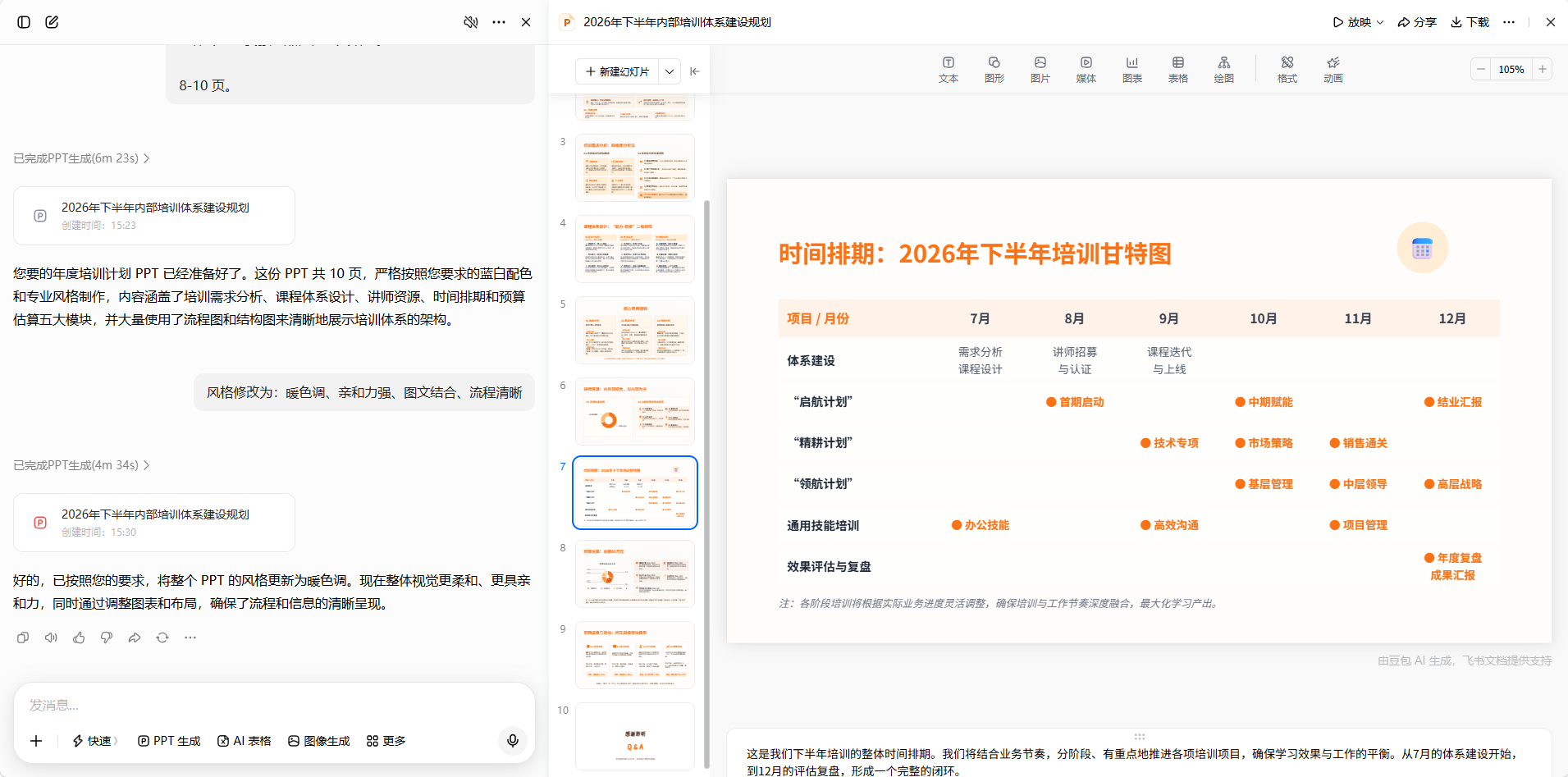
Location: Doubao’s generated PPT preview, showing the style effect. Also a comparison of the same content generated with different style descriptions.
Key takeaway: Before, you had to pay for templates, spend time finding inspiration, and put in effort to learn layout. Now you just tell AI “I want this kind of feel,” and it delivers. You’re not a designer, and you don’t need to be. If you can talk, you can make a good-looking PPT.
Scenario 4: Suddenly asked to give a share-out — you have materials but don’t know where to start?
This scenario will sound familiar — your boss suddenly says “At next week’s meeting, share your experience with XX work / your thoughts on optimizing the XX process with everyone.” You have policy documents, process notes, and data reports, but these are things “you read yourself,” not things “you tell others.”
You don’t have sharing experience, so you don’t know how to design the content rhythm: How deep should you go? What should you cover first and what later? How do you open without putting everyone to sleep? What should go on the first slide of the PPT?
The core problem isn’t “no content” — it’s “not knowing which content goes where on the PPT.” In that case, just throw your materials at AI.
Use Doubao — upload your materials and get a first draft in two steps
Step 1: Gather all related materials you can find, organize them, and send them to Doubao
No need for perfect formatting. Policy documents, process docs, work notes — extract the main content and send it along with your requirements:
1 | I'm giving an internal share-out next week, the topic is "Experience in Optimizing the New Employee Onboarding Process." |
Then paste in your document content.
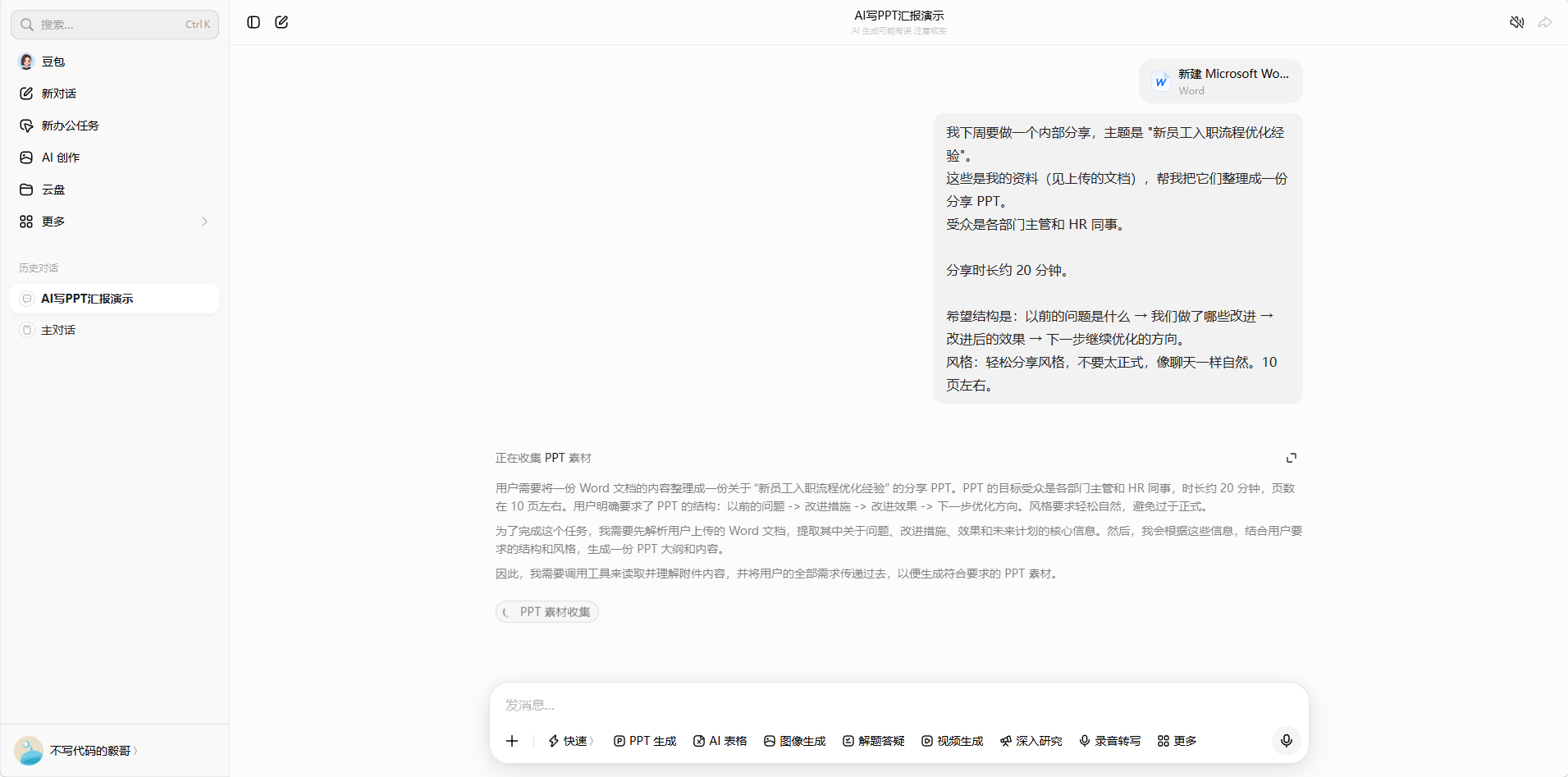
Location: Doubao document upload / paste material interface + Prompt input
Step 2: The PPT generates directly, AI organizes the structure for you
Doubao will read through your materials and automatically extract a structure suitable for “telling others.” It does several things for you:
- Filtering: Which content is worth talking about, which details can be skipped
- Sequencing: What to cover first and what later, arranged according to the audience’s cognitive logic
- Packaging: Turning “notes for yourself” into “points others can understand”
A content-rich, logical share-out PPT comes out directly.
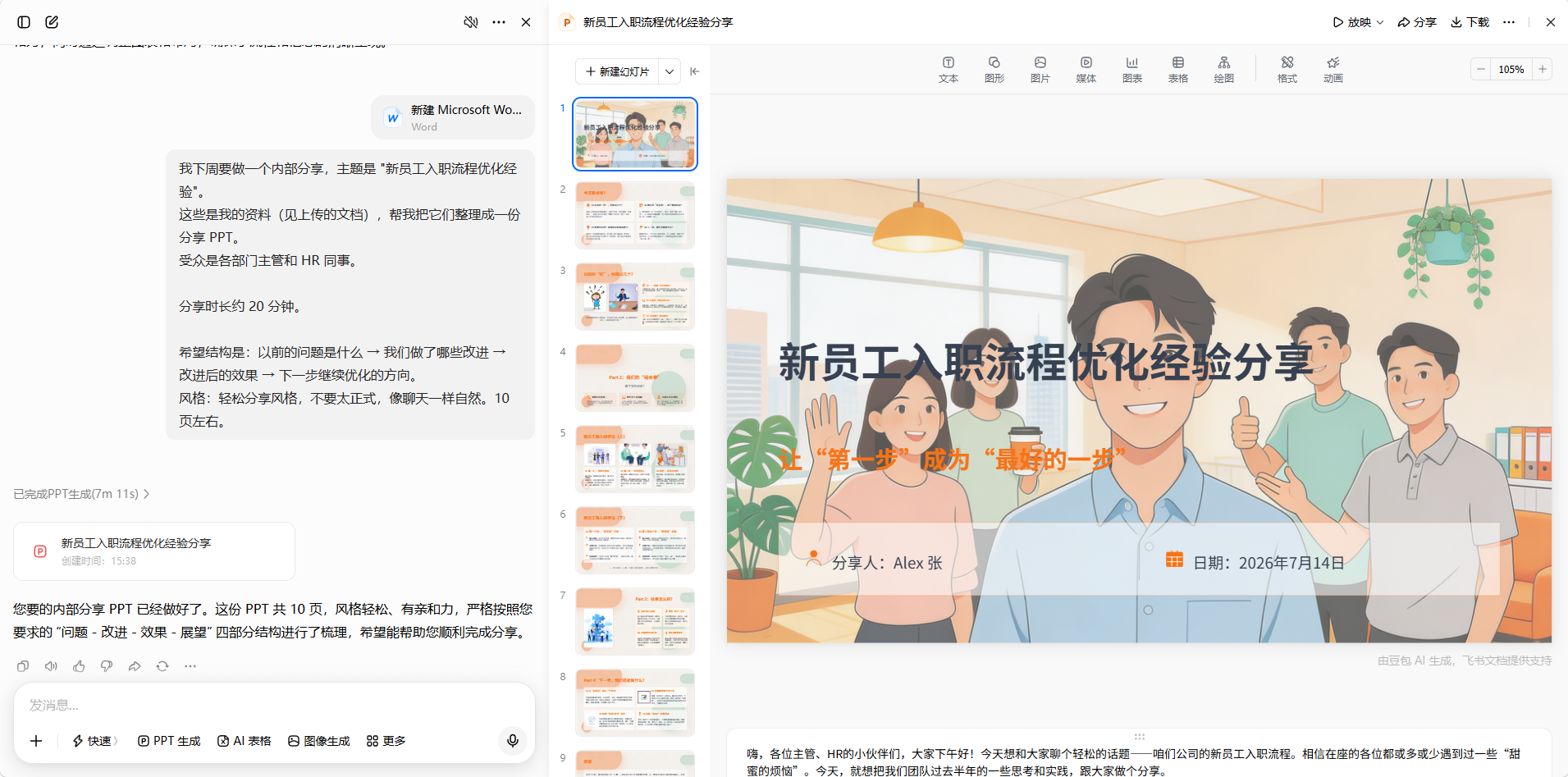
Location: Doubao’s generated PPT preview
Step 3: After downloading, fine-tune to your own voice
The AI-generated draft’s content and structure are already quite complete. You just need to:
- Change places where AI wrote too “formally” to match your own speaking habits
- Add some real details or small stories you find interesting
- Confirm there are no factual errors
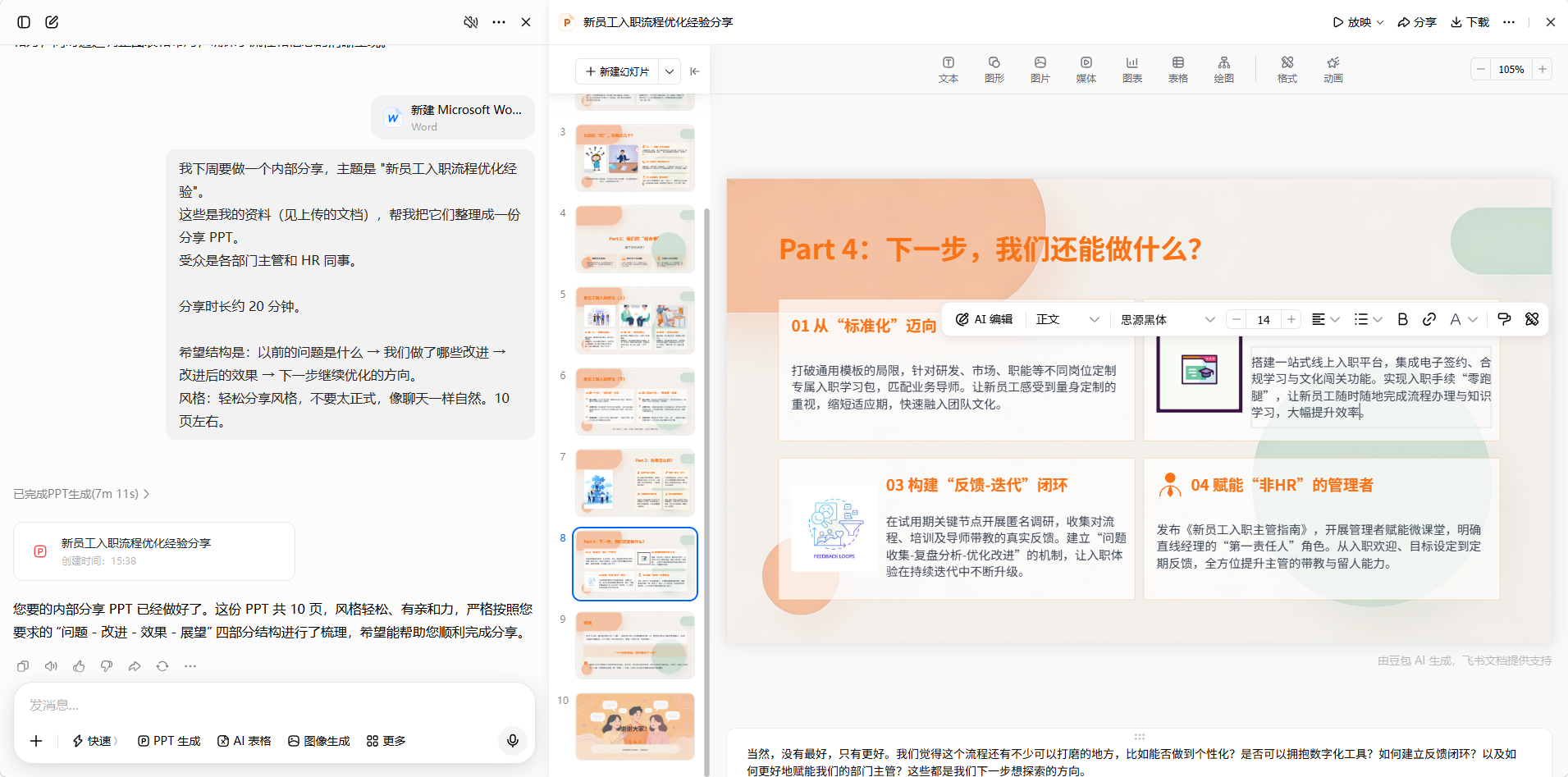
Location: The finished PPT while being edited
Key takeaway: You don’t need sharing experience. AI doesn’t just make you a PPT — it helps you figure out “how to present” — the translation process from “a pile of materials” to “a share-out you can present to colleagues” is handled by AI.
🔄 Kimi backup: If you have super long documents (over 20,000 characters) that you need AI to read, try Kimi PPT Assistant — it can upload large files at once. But again, watch out for the queuing issue — if you’re not in a hurry you can wait; if you need to deliver fast, use Doubao.
💡 By the way: If even your materials are fragmented, go back to the Scenario 2 method — first verbally list what’s scattered in your chat logs and notes, then throw it at AI. Works just as well.
📋 Prompt Templates (just copy and replace the content in brackets)
🔥 Admin/HR/Finance Monthly Report (Scenario 1, use Doubao)
1 | Help me make a [month] work monthly report PPT. |
🔥 Quarterly / Half-Year Summary (Scenario 2, use Doubao)
1 | Help me make a [time period] work summary PPT. |
🔥 General Version for When You Have Nothing (works with any tool)
1 | Help me make a [time period] work report PPT. |
🔥 For When You Want Good Design But Can’t Lay Out (Scenario 3 dedicated)
1 | Help me make a [topic] PPT. |
Don’t know how to describe the style? Scroll up to the “Common Style Keywords” table and copy directly.
🔥 Sudden Share-out / Experience Sharing (Scenario 4, use Doubao, upload documents if you have lots of materials)
1 | I'm giving an internal share-out next week, the topic is [share-out title]. |
🔄 Other Usable Tools, By the Way
| Tool | Free Quota | One-Line Review |
|---|---|---|
| Doubao AI | Unlimited | ⭐ Top pick, fastest and most stable, covers all four scenarios |
| Kimi PPT | 3/month | Can upload long documents, but the free version often queues — mediocre experience |
| Tongyi Qianwen | Has free quota | Rich templates, especially good for the education and training industry |
| Baidu Wenku | Unlimited | Rigorous content but outdated templates |
| WPS AI | 7-day trial | Convenient for WPS users, but requires payment |
💡 Summary
For four scenarios, the main tool is just one — Doubao AI:
| Your Situation | How to Do It |
|---|---|
| Nothing to write about (Admin/HR/Finance/Customer Service) | List what you did day-to-day, Doubao packages it into a report framework |
| Have stuff but no time to organize (swamped) | Throw your fragmented records at Doubao, it auto-structurizes them |
| Can’t design, don’t want to buy templates (most office workers) | Describe what you want it to look like, Doubao gives you a free professional template |
| Suddenly asked to share (have materials but no experience) | Paste your materials to Doubao, it translates “notes for yourself” into “a PPT to tell others” |
🔄 If Doubao doesn’t meet your needs (e.g., you need to upload super long documents), use Kimi PPT Assistant as a backup — 3 free uses per month. But the free version often queues, so try it when you’re not in a hurry.
What all four scenarios have in common: You don’t need to learn any new skills, you don’t need to pay for tools or templates, and you don’t even need to organize your language. You just need to say what’s on your mind, and Doubao handles the rest.
Making a PPT is not an exam — it’s a communication tool. Weekends are for resting, so don’t waste your time tweaking font sizes and alignment.
This article was first published on hydeh.com