Background
My personal technical blog, hydeh.com, is built on the Hexo framework. This entire SEO optimization effort was completed collaboratively through conversations using Codex CLI (an AI coding assistant).
The focus of this article is not only on what was specifically fixed, but more importantly — choosing the right tech stack determines how far AI can help you.
Hexo vs WordPress: Framework Selection in AI Collaboration Scenarios
Before starting any SEO work, it is essential to understand that different frameworks vary dramatically in how “AI-friendly” they are. The following comparison is based on the same task — letting AI perform SEO optimization on your website:
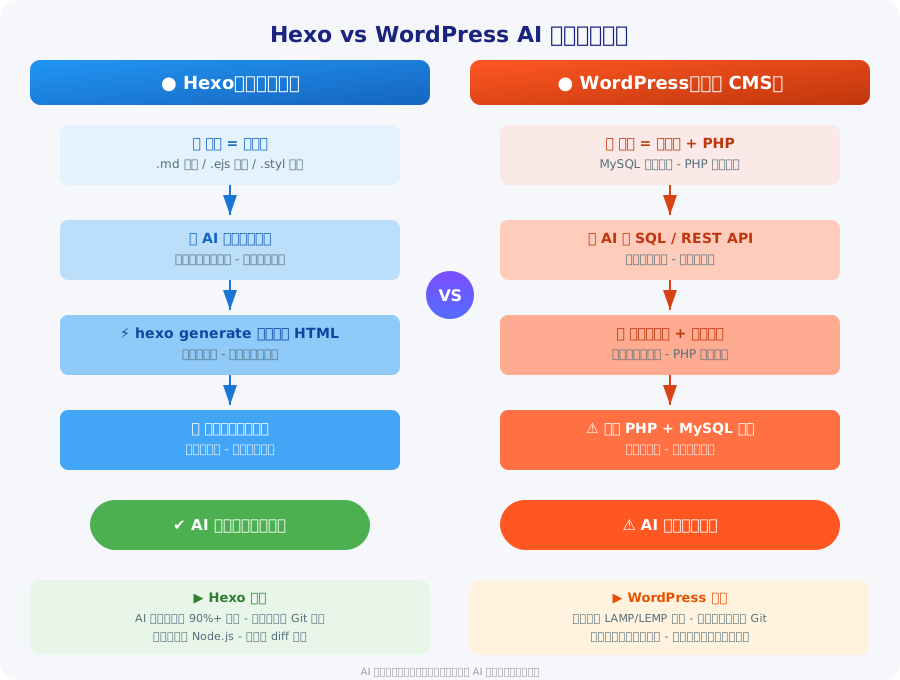
| Dimension | Hexo (Static Site Generator) | WordPress (Dynamic CMS) |
|---|---|---|
| Content Storage | Plain text files (.md / .ejs / .styl) | MySQL database + PHP files |
| AI Operation Method | Directly read/write files (AI’s core strength) | Requires SQL statements or REST API + auth tokens |
| Operational Risk | Low — file operations are reversible and diffable | Medium-high — database misoperations have broad impact |
| Local Development Environment | A single hexo server command, no database needed |
Requires a full environment: PHP + MySQL + Web server |
| Deployment Workflow | hexo generate produces pure static files → upload to server |
Export database + migrate files + configure environment variables |
| Version Control | All files under Git: posts, configs, templates, styles | Only PHP files can be tracked; database content cannot be managed in Git |
| What AI Can Do | Full lifecycle management: CRUD on all files involved in posts, configs, templates, styles, building, and deployment | Limited: can only modify PHP templates; post content requires API or SQL |
| Multi-AI Collaboration | Multiple AI sessions can operate on different files simultaneously without conflicts | Must consider database connection locks, transaction isolation, etc. |
| Security | Pure file operations; sensitive data (tokens/passwords) lives in config files, controllable and auditable | Additional security concerns: SQL injection, API authentication, session management |
Core Difference Summary
Everything in Hexo is a file. AI’s most core and capable skill is reading and writing files. This means:
- Give AI a file path and it can create, read, update, or delete any content
- From post bodies and config files to template logic and stylesheets, everything can be described in natural language
- Build outputs are also static files — no runtime environment required, and publishing is just file upload
- AI can participate in the entire chain of site building, optimization, and operations
WordPress stores content in a database. For AI to operate on content, it needs to:
- Either execute SQL through a database client (high risk, requires permissions)
- Or use the WordPress REST API (requires additional auth configuration and API keys)
- Handle database migration, environment differences, and PHP version compatibility during deployment
- AI’s involvement is limited; most database-level operations still require human intervention
Conclusion: If you plan to heavily use AI for site building, SEO optimization, and daily content operations, file-based static site generators like Hexo are the more efficient and secure choice. AI can manage every step from content authoring and technical optimization to deployment and release, whereas WordPress’s database dependency makes AI’s involvement complex and constrained.
What SEO Requires — and How AI Accomplishes It with Natural Language
The following is categorized by SEO work type. Each category explains what needs to be done and how AI generates detailed content through natural-language input:
1. Basic Meta Configuration
What to do:
- Set a unique
title,description, andkeywordsfor each page - Configure
robotstags (index/follow) - Add
canonicallinks - Set Open Graph / Twitter Card social tags
How AI completes it: Simply tell AI “add standardized meta tags to all pages”, and AI will scan the template files, inject the tags in batches, extract post excerpts as descriptions, and generate a complete tag structure following SEO best practices.
2. Structured Data (Schema)
What to do:
- JSON-LD: Person, WebSite, Article, BreadcrumbList
- Auto-generate Article schema for each post
- Generate BreadcrumbList for non-post pages
How AI completes it: Describe the business scenario and requirements (e.g., “I’m the author of a personal tech blog and need to add personal information structured data”). AI will automatically write the EJS template logic, read post metadata, dynamically render the JSON-LD, and verify the syntax.
3. Performance Optimization
What to do:
- Compress or remove large files (fonts, images, JS)
- Add
defer/asyncto non-critical JS - Optimize the critical rendering path
- Remove render-blocking resources
How AI completes it: Tell AI “the page loads too slowly, analyze where the bottleneck is”. AI will automatically scan the file size distribution, identify the largest resources, suggest replacements, and execute the changes. For example, upon finding a 10MB custom font, AI directly replaces it with a system font stack and compares the size before and after.
4. Web Accessibility
What to do:
- Allow viewport scaling
- Add ARIA landmarks (main, nav, etc.)
- Ensure text contrast meets standards (WCAG AA ≥ 4.5:1)
How AI completes it: Tell AI “the site needs to comply with accessibility standards”. AI automatically scans CSS color values, calculates contrast ratios, adjusts color values, and verifies compliance, while fixing viewport and ARIA attributes.
5. URL Structure Optimization
What to do:
- Avoid Chinese-character paths
- Configure URL aliases / redirects
- Ensure a clean permalink structure
- Handle URLs for category/tag pages
How AI completes it: Just say “change category URLs to pinyin”, and AI automatically configures category_map, batch-replaces all internal links, and verifies the accessibility of every path.
6. Search Engine Verification and Submission
What to do:
- Register with Google Search Console / Baidu Resource Platform
- Add verification meta tags
- Generate and submit sitemaps
- Actively push URLs (Baidu API)
How AI completes it: Provide the verification code, and AI automatically embeds it into the templates, configures sitemap generation rules, exports the full URL list, and constructs the push requests. Sensitive tokens remain under human control in config files — AI references them rather than hardcoding them.
7. Content Optimization
What to do:
- 120–160 word meta description for each post
- Reasonable keyword placement
- Internal linking network
- Cross-referencing between articles
How AI completes it: Tell AI “write SEO descriptions for all posts, around 150 words each, including core keywords”. AI will read each post, extract key information, generate description text complying with SEO standards, and automatically write it into the post front-matter. Content edits, adding internal links, adjusting article structure — all can be done with a single natural-language sentence.
8. SPA SEO
What to do:
- Add correct head information to pre-rendered pages
- Inject title / description / canonical
- Ensure search-engine crawlability
How AI completes it: Describe the SPA structure, and AI automatically locates the pre-rendered files, reads them in batches, injects complete head tags, and adds canonical links. For 65 pre-rendered pages, AI completed all fixes in minutes.
Actual Results of This Optimization
| Metric | Before Optimization | After Optimization |
|---|---|---|
| Critical path resources | ~1,000KB (including a 973KB font) | ~77KB |
| Page title | undefined-undefined | Normal |
| Structured data | None | 4 Schema types |
| Pre-rendered pages | 65 pages with empty head | Complete meta tags |
| Category URLs | Chinese paths | Pinyin |
| Mobile zoom | Disabled | Enabled |
| Contrast ratio | Multiple non-compliant | WCAG AA |
| Search engine verification | Not configured | Google + Baidu |
| Sitemap submission | Not submitted | Submitted to both |
The entire optimization workflow — from diagnosis and coding to building and verification — took approximately 2 hours — most of which was AI executing the work, with humans mainly responsible for direction confirmation and review.
Key Takeaways from AI Collaboration
Human Responsibilities
- Set goals and strategic direction
- Confirm the feasibility of technical solutions
- Review code security (token sanitization)
- Final decisions and deployment
AI Responsibilities
- Full file scanning and problem identification
- Code authoring and batch modifications
- Build verification and error troubleshooting
- Automation of repetitive tasks
Advantages of AI + Human Collaboration
- Efficiency: Work that originally took 2 days was completed in roughly 2 hours
- Comprehensiveness: AI scanning leaves no file overlooked, more thorough than manual inspection
- Reproducibility: The same SEO strategy can be quickly applied to other projects
- Low risk: Pure file operations where every step can be reviewed via Git diff, with rollback on errors
- Continuous iteration: Daily content updates and SEO optimization of new posts can be continuously maintained through AI without manual intervention each time
Conclusion
For file-based static sites like Hexo, AI can handle nearly all technical work from site building to SEO optimization. Humans only need to steer the direction, review results, and handle sensitive information — and then write the content itself.
The key insight is: your tech stack choice determines how deeply AI can participate. Hexo’s pure-file architecture enables AI to engage throughout the entire process, while WordPress’s database dependency sets a ceiling on that participation.
If your site also plans to heavily rely on AI for operations and maintenance, choosing the right framework matters more than learning a particular tool. In the AI era, “is this tech stack AI-friendly?” has become a key selection criterion.