The real pain of writing a weekly report isn’t that you can’t write—it’s that you’re missing a “translator” to convert your day-to-day tasks into report-ready language.
Every Friday afternoon, three types of people feel their moods hit rock bottom on schedule:
Type one — admins, HR staff, and customer service reps. You haven’t been idle this week: you coordinated meeting rooms for three departments, processed more than twenty expense reports, answered countless emails, updated the contact list, and bought office supplies. But when these things land on a weekly report, even you feel they look shabby: “Processed expense forms,” “Scheduled meeting rooms,” “Answered emails.” It reads less like a report and more like a raw work log.
Type two — sales, marketing, and project professionals. You’ve done a lot: visited five customers, followed up on two leads, put together a proposal, and sat in on three meetings. But your report isn’t for you—it’s for your manager. Your manager wants results and progress, while your report is full of process and actions.
Type three — you’ve just switched roles, or your company keeps changing the report format. Last week it was “Completed this week + Plan for next week”; this week it suddenly needs to follow the OKR format. Every format calls for a completely different way of writing, and you don’t even know where to start.
In truth, most of the suffering in writing weekly reports doesn’t come from a lack of ability—it comes from not knowing how to “translate”: turning a running log into a report, turning actions into results, and turning fragments into structure.
This translation job can be handled today with a free tool — DeepSeek.
Tool Introduction
DeepSeek (by DeepSeek Inc.)
- Website: https://chat.deepseek.com (web version; apps available on major app stores)
- Free quota: completely free, unlimited usage
- Why use it for weekly reports: DeepSeek excels at text processing and structured organization. Give it fragmented information and it turns it into clear, logical paragraphs. No prompt engineering required—just chat with it in plain language.
Scenario 1: Too Many Small Tasks, Nothing to Put in the Report?
If you’re in an admin, HR, or customer service role, your work isn’t “completing a project” — it’s “handling one thing after another.” When it lands on a report, it’s all trivial details that you feel too embarrassed to submit.
Turn a Running Log into a Weekly Report with DeepSeek
Step 1: Open chat.deepseek.com and list everything that comes to mind

No formatting, no categorization, no polishing. Just type it out the same way you’d complain to a colleague about what you did this week:
1 | Help me write a weekly work report. |
Step 2: Hit send, and DeepSeek does three things for you
- Categorizes: Automatically groups all the scattered tasks into a few major categories (admin support, procurement management, HR assistance, etc.)
- Extracts: Pulls a reportable description out of entries like “fix the printer” and “book flights”
- Polishes: Turns your “booked the manager’s flights” into report-ready phrasing like “completed manager’s travel arrangements”
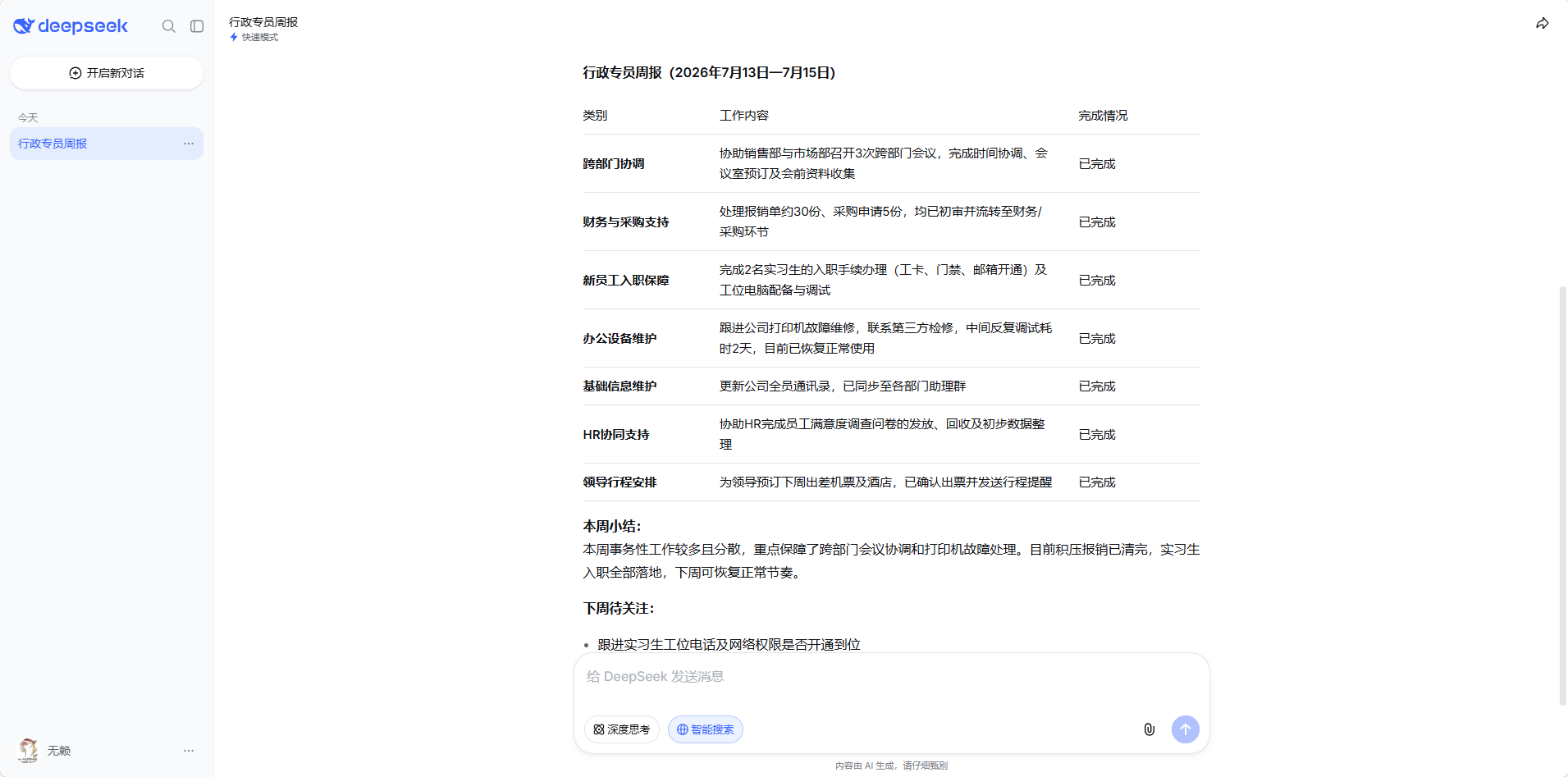
Step 3: Skim it, make minor tweaks, and send
DeepSeek’s first draft is already usable. You just need to:
- Check whether the categorization makes sense (if not, tell it “group XX and XX together”)
- Add any small detail you want to include
- Copy it into your report template
Key takeaway: Talk to DeepSeek like you’d talk to a colleague — no need to think about “structured thinking.” The more casually you describe things, the more neatly it organizes them.
Scenario 2: Lots Done, But It Reads Like a Running Log?
Roles like sales, marketing, and project management — you visited customers and pushed projects forward, but your report is full of “what I did” with no sense of “how far it got.” Your manager won’t think you worked hard; they’ll just think you’re padding the word count.
Let DeepSeek Turn “Actions” into “Progress”
Step 1: Describe what you did this week and the results
The input can be even messier — include data when you have it, gut feelings when you don’t. For example:
1 | Help me write a weekly report for a sales role. |
Step 2: DeepSeek gives you a logical weekly report
You’ll notice a few differences between what AI produces and what you’d write yourself:
| What you’d write | What DeepSeek writes |
|---|---|
| Visited 3 customers | Focused on 3 interested customers this week; 2 have confirmed purchase intent. Proposals and quotes have been sent, with feedback expected next week |
| Organized potential customer pool | Completed the H2 potential customer pool review, screening out 50+ leads to follow up, building a pipeline for the Q3 push |
| Competitor running price war | ⚠️ A competitor in South China has cut prices recently, raising customer price sensitivity. Recommend preparing a differentiation plan ASAP |
Same information, completely different “packaging.” That’s the value of AI — you don’t need to learn how to write corporate prose; AI translates it for you.
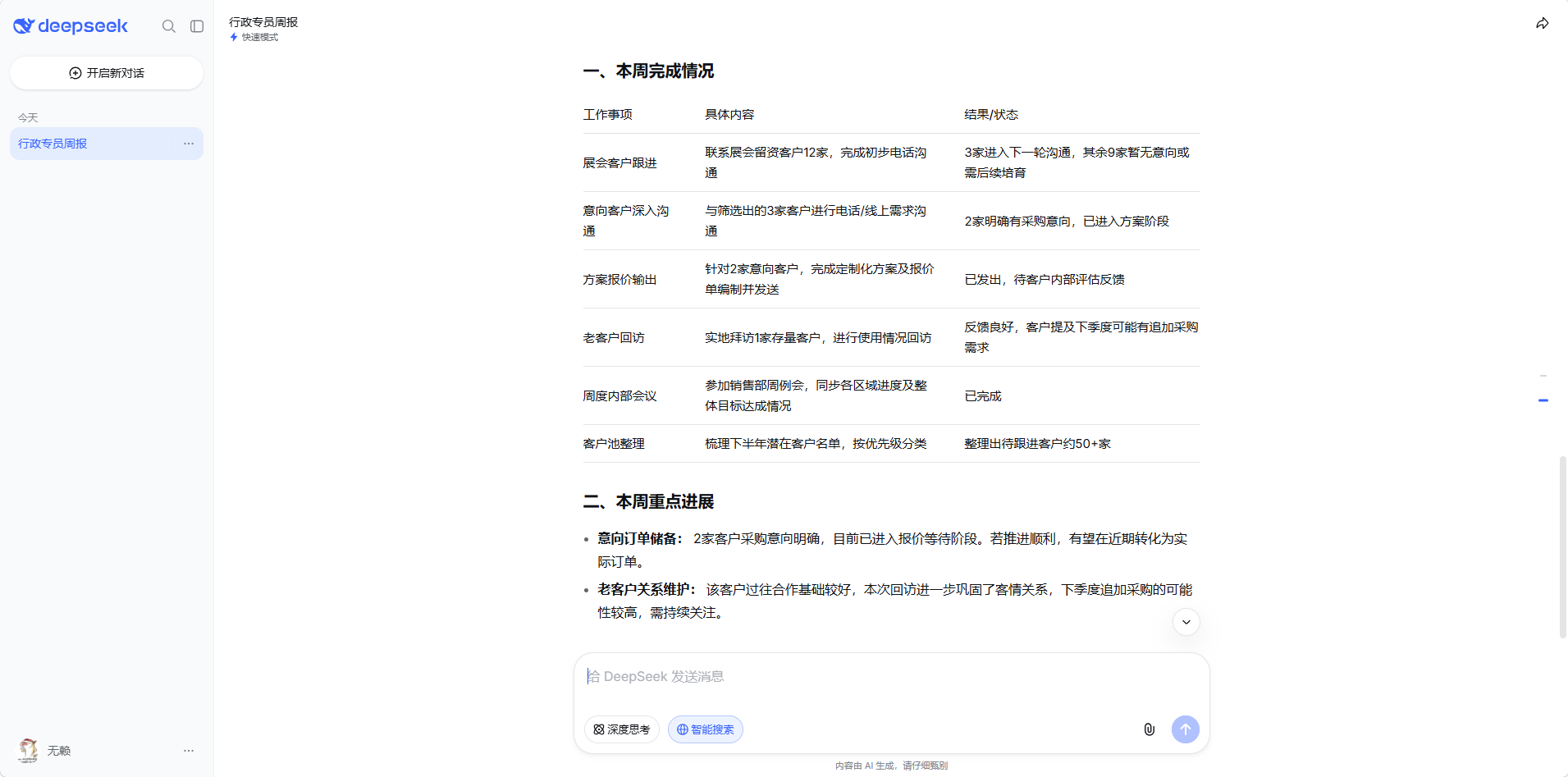
Step 3: Check for any exaggeration, tweak the wording, and send.
Advanced usage: If you want two versions — one for your direct manager (detailed) and one for the big boss (results only) — just say:
1 | That report is too detailed. Write me a concise version for the VP, focusing only on key points and results, within 200 words. |
AI compresses the same content into a high-level executive summary. One action, two reports.
Scenario 3: Switched Roles / Companies, Report Format Is Completely Different?
Every company and role has different report requirements. Some want OKRs, some want project-based, some want modular breakdowns, some just want three key points. The format you used in role A last week is useless when you move to role B.
No need to learn the format — just tell DeepSeek the report requirements you received:
1 | From now on, you're my weekly report assistant. |
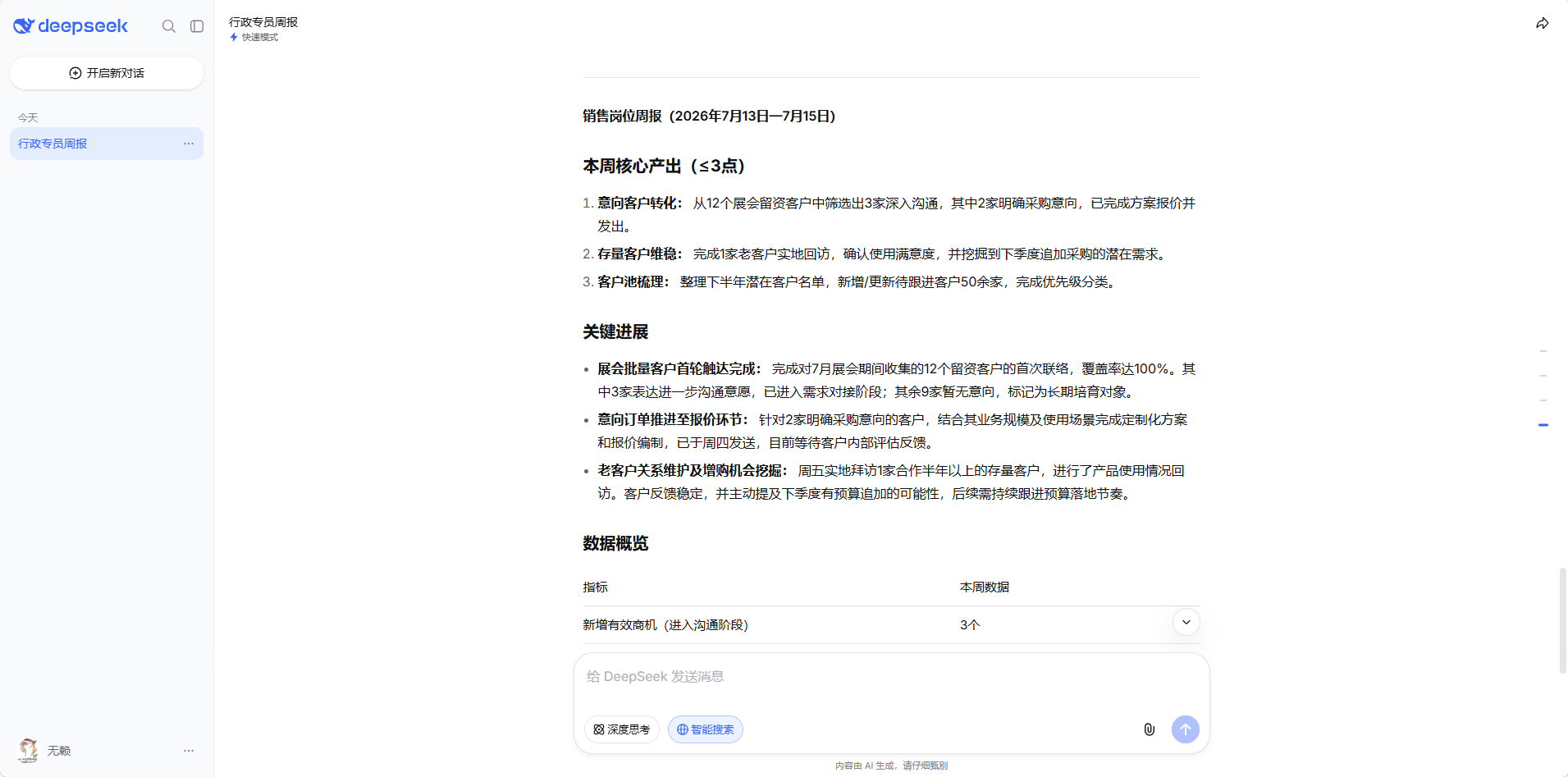
DeepSeek automatically matches the format. Whatever your role, whatever format your company uses — just tell it. No learning required on your end.
Even if you can’t even articulate the format requirements, send a screenshot of the report template your company sent last week (or paste someone else’s report) and say:
1 | This is our company's weekly report format (see below). Write my weekly report in this format: [what I did...] |
Quick Reference for Common Report Formats (tell DeepSeek which one to use)
| Format | Suitable for roles | Tell DeepSeek |
|---|---|---|
| Standard | Admin / HR / Customer Service | Use the “Completed this week + Plan for next week + Resources to coordinate” format |
| OKR | Internet / Startup companies | Use the OKR format: Objective → Key Results → Completion status |
| Project-based | Sales / Marketing / Project Manager | Use project-progress format: Project name → Current stage → Actions this week → Actions next week |
| Modular | Finance / Legal / Support staff | Organize by work module: Module 1 → Completed items, Module 2 → Completed items… |
| Three-things | Executives / Quick updates | Write only the 3 most important things this week + 1 issue needing senior attention |
Prompt Templates (copy directly, replace the content in brackets)
General Weekly Report (works for any role)
1 | Help me write a weekly work report. |
Admin / HR / Customer Service Weekly Report (daily-tasks version)
1 | Help me write a weekly report for [role]. |
Sales / Marketing / Project Weekly Report (progress version)
1 | Help me write a weekly report for [role]. |
No Time Left — Just Three Sentences
1 | I have to submit my weekly report right now and don't have time to write. Summarize the following into 3 key points: |
By the Way — Other Useful Tools
| Tool | Free quota | One-line review |
|---|---|---|
| DeepSeek | Completely free, unlimited | ⭐ First choice for weekly reports; best at text organization and structuring |
| Kimi | Completely free | Works too, but DeepSeek is more natural at text polishing |
| Doubao | Completely free | Good for generating PPTs; less reliable than DeepSeek for reports |
| Tongyi Qianwen | Has free quota | Solid all-rounder, no obvious weaknesses |
💡 Doubao’s strength is generating PPTs; DeepSeek’s strength is organizing text. Combine the two and you’ve solved the two biggest pain points of workplace reporting.
Summary
The pain of writing a weekly report isn’t “you can’t write” — it’s that you lack a “translator” to convert your daily tasks into report-ready language.
| Your situation | What to do |
|---|---|
| Too many small tasks, nothing to write | Dump your running log on DeepSeek; it categorizes, extracts, and polishes for you |
| Lots done, but reads like a running log | Mix actions and results together; let DeepSeek separate “what I did” from “how far it got” |
| Changed roles, can’t write the new format | Tell DeepSeek the format requirements; it automatically matches it for you |
The common thread across all three scenarios: you don’t need to learn any writing techniques. Open DeepSeek → describe what you did → report done.
Start writing your report at 3 PM on Friday, submit before 5, and grab a coffee in between.
This article was first published on hydeh.com