Many enterprises invest heavily in content creation and link building, yet their rankings refuse to budge. After thorough investigation, the root cause often lies in the most fundamental technical layer — search engines simply cannot crawl and index their website’s content effectively.
Technical SEO is like the foundation of a house. No matter how beautiful the structure, it will collapse if the foundation is unstable.
According to official Google data, Core Web Vitals have become an official ranking factor. Websites with an LCP (Largest Contentful Paint) exceeding 4 seconds rank significantly lower in mobile search results than those loading within 2.5 seconds. For websites with solid technical SEO, speed optimization alone can deliver a 15%–30% increase in organic traffic.
This article walks you through a complete technical SEO audit and optimization for enterprise websites across seven dimensions. Each section includes inspection methods, recommended tools, and concrete optimization strategies.
The Complete Technical SEO Audit Framework
A technical SEO audit can be broken down into seven core modules. It is recommended to inspect each in the following order:
1 | 1. Crawlability Check → Can search engines find your pages? |
I. Crawlability Check
Search engines discover and crawl web pages through spiders (crawlers). If crawlers cannot access your website smoothly, even the best content will never be indexed.
1.1 robots.txt Check
Checklist items:
- Does a robots.txt file exist?
- Are any important pages accidentally blocked?
- Does it correctly point to the sitemap?
Detection method:
Visit your-domain.com/robots.txt directly and review its contents.
Common issues:
| Issue | Symptom | Fix |
|---|---|---|
| Site-wide block | Disallow: / |
Remove the erroneous Disallow rule |
| Blocking CSS/JS | Disallow: /wp-includes/ or similar |
Ensure resources required for rendering are not blocked |
| No sitemap directive | Missing Sitemap directive | Add Sitemap: /sitemap.xml |
Example of a correct robots.txt:
1 | User-agent: * |
1.2 Google Search Console Coverage Report
Checklist items:
- Number of indexed pages vs. actual number of pages on the site
- Reasons for excluded pages
- Crawl errors
Detection method:
Google Search Console → Indexing → Pages → Coverage report
Common exclusion reasons:
| Reason | Description | Recommendation |
|---|---|---|
| Crawled — currently not indexed | Content quality may be low | Improve content quality, add internal links |
| Discovered — currently not indexed | Crawler found but did not fetch | Improve content quality, submit for indexing |
| Blocked by robots.txt | robots.txt forbids crawling | Check and fix robots.txt |
| Excluded by noindex | Page has a noindex tag | Remove unnecessary noindex tags |
| Duplicate content | Deemed a duplicate page | Use canonical to specify the canonical page |
1.3 Sitemap Check
Checklist items:
- Does an XML Sitemap exist?
- Are all URLs in the Sitemap accessible?
- Has it been submitted to Google Search Console?
Detection methods:
- Visit
your-domain.com/sitemap.xml - Use the “Sitemaps” report in GSC
Best practices:
- Only include pages that should be indexed in the Sitemap
- A single Sitemap should not exceed 50,000 URLs or 50MB
- Generate and update automatically
- For large websites, split into multiple sitemaps by content type
1.4 Crawler Simulation Test
Checklist items:
- Does the search engine see the same page as users?
- Is important content dynamically generated by JavaScript?
Detection tools:
- Google Search Console → URL Inspection → View crawled page
- Screaming Frog SEO Spider
- View Page Source (not Inspect Element)
Common issues:
- SPA websites (Vue/React frontends) render all content via JS, which crawlers may not capture
- Images and videos lack alt text
- Important content is hidden inside tabs or accordions
II. Indexation Control
Not every page deserves to be indexed by search engines. Controlling the indexation scope prevents thin content from dragging down the overall site authority.
2.1 Pages That Should Be Indexed
| Page Type | Index? | Description |
|---|---|---|
| Homepage | ✅ Yes | The most important page |
| Product/Service pages | ✅ Yes | Core conversion pages |
| Blog posts | ✅ Yes | Long-tail traffic entry points |
| About/Contact pages | ✅ Yes | Trust signals + conversion |
| Category pages | ✅ Yes (when unique descriptions exist) | Content organization pages |
| Tag pages | ⚠️ Optional | Index only if content is substantial; otherwise noindex |
| Pagination pages | ❌ No | Prone to duplicate content |
| Search results pages | ❌ No | Typical thin content |
| Privacy policy / Terms | ⚠️ Optional | Generally no need to index |
| Login/Register pages | ❌ No | No SEO value |
2.2 Four Methods of Indexation Control
| Method | Function | Use Case |
|---|---|---|
| robots.txt | Blocks crawling | Entire directories, admin panels, sensitive pages |
| noindex tag | Blocks indexing (allows crawling) | Individual pages, thin-content pages |
| canonical tag | Specifies the canonical URL | Duplicate content, similar pages |
| GSC Removals tool | Temporary removal | Emergency page takedown |
2.3 Correct Use of the canonical Tag
The canonical tag tells search engines “which URL is the authoritative version of this page,” making it a powerful weapon against duplicate content.
Common duplicate-content scenarios:
- The same article appearing under multiple categories
- URLs with parameters (e.g.
?utm_source=...) - Pagination pages (page 2, page 3)
- Separate mobile and desktop URLs
- HTTP and HTTPS versions
Best practices:
- Every page should have a canonical tag
- canonical should point to a full absolute URL (including the domain)
- Pagination pages’ canonical should point to page 1 (or to itself, depending on strategy)
- Use
hreflangrather than canonical for different language versions
III. Website Speed Optimization
Page speed is one of the core factors affecting SEO. Google’s Core Web Vitals metrics have become an official ranking signal.
3.1 The Three Core Web Vitals
| Metric | Full Name | Good Threshold | Description |
|---|---|---|---|
| LCP | Largest Contentful Paint | < 2.5s | Render time of the largest content element |
| FID | First Input Delay | < 100ms | Time from first user interaction to browser response |
| CLS | Cumulative Layout Shift | < 0.1 | Sum of unexpected layout shifts on the page |
As of March 2024, Google replaced FID with INP (Interaction to Next Paint), with the same good threshold of < 200ms.
3.2 Speed Testing Tools
| Tool | Purpose | Rating |
|---|---|---|
| PageSpeed Insights | Google’s official tool, desktop + mobile scores | ⭐⭐⭐⭐⭐ |
| Lighthouse | Built into Chrome DevTools, comprehensive audit | ⭐⭐⭐⭐⭐ |
| WebPageTest | Detailed loading waterfall charts | ⭐⭐⭐⭐ |
| GTmetrix | Composite score + recommendations | ⭐⭐⭐⭐ |
| Chrome DevTools | Network + Performance panels | ⭐⭐⭐⭐⭐ |
3.3 Speed Optimization Priority Checklist
There are many speed optimization items. Rank them by return on investment:
🔴 High Priority (low effort, high impact)
1) Image Optimization
Images typically account for 60%–70% of page size, making them the top optimization priority.
| Optimization | Method | Expected Result |
|---|---|---|
| Format conversion | JPG → WebP/AVIF | 25%–50% size reduction |
| Size adaptation | Output at actual displayed size | 50%–80% size reduction |
| Compression quality | Quality 80–85 (barely noticeable to the eye) | 30%–40% size reduction |
| Lazy loading | loading="lazy" for below-the-fold images |
40%–60% reduction in above-the-fold load |
| Responsive images | srcset + sizes |
Load appropriate size for each device |
2) Enable Compression
- Enable Gzip or Brotli compression on the server
- Text resources (HTML/CSS/JS) can typically be compressed by 60%–80%
3) Static Asset Caching
- Set appropriate Cache-Control headers
- Cache static files (images, CSS, JS) for 1 year
- Cache HTML pages for a shorter duration or not at all
🟡 Medium Priority (moderate effort, noticeable impact)
4) CDN Acceleration
- Host static assets on a CDN for geographically proximate access worldwide
- China recommendations: Alibaba Cloud CDN, Tencent Cloud CDN, Qiniu Cloud
- International recommendations: Cloudflare, Vercel, Netlify
5) Reduce HTTP Requests
- Merge CSS/JS files (where appropriate)
- Use SVG sprites or icon fonts for small icons
- Reduce third-party scripts (analytics, ads, customer support widgets, etc.)
6) Code Optimization
- Remove unused CSS and JS
- Defer loading of non-critical JS
- Place CSS in
<head>and JS before</body>
🟢 Low Priority (high effort, diminishing marginal returns)
7) Server Upgrade
- Upgrade CPU / memory / bandwidth
- Migrate from shared hosting to a VPS or cloud server
8) Preconnect and Preload
preconnectto third-party domainspreloadcritical resources
3.4 Real-World Optimization Case Study
Before/after comparison for an enterprise website:
| Metric | Before | After | Improvement |
|---|---|---|---|
| Homepage LCP (mobile) | 4.2s | 2.1s | -50% |
| Homepage LCP (desktop) | 2.8s | 1.2s | -57% |
| PageSpeed mobile score | 45 | 92 | +47 points |
| PageSpeed desktop score | 72 | 98 | +26 points |
| Page size | 3.8MB | 1.5MB | -61% |
| Request count | 68 | 32 | -53% |
| Organic traffic (after 3 months) | Baseline | +28% | +28% |
Key optimization measures (ranked by contribution):
- WebP conversion + size adaptation for images (~40% contribution)
- CDN integration (~25% contribution)
- Removal of unnecessary third-party scripts (~15% contribution)
- CSS/JS minification and bundling (~10% contribution)
- Font optimization (~5% contribution)
- Other minor optimizations (~5% contribution)
IV. Mobile-Friendliness
Mobile search now accounts for over 60% of total search volume. Google has also fully transitioned to Mobile-First Indexing.
4.1 Mobile SEO Checklist
| Check Item | Requirement | Detection Method |
|---|---|---|
| Responsive design | Displays correctly on all devices | Chrome device emulation / real device testing |
| Font size | Body text ≥ 16px, no zoom required | Manual check |
| Tap target size | Buttons ≥ 48×48px | Manual test + Lighthouse |
| Load speed | Mobile LCP < 2.5s | PageSpeed Insights |
| Viewport setting | <meta name="viewport"> |
View source |
| Popup handling | Does not obscure main content | Manual check |
| Content parity | Mobile and desktop content consistent | GSC URL Inspection |
4.2 Common Mobile Issues
1) Font too small
Many desktop sites render text extremely small on mobile, requiring pinch-to-zoom to read.
Fix: Set the viewport meta tag and use responsive font sizes.
2) Tap targets too small
Navigation menus and buttons are too cramped, making them hard to tap with a finger.
Fix: Ensure clickable areas of buttons and links are at least 48×48px with adequate spacing.
3) Horizontal scrollbar
A horizontal scrollbar appearing on mobile indicates an element exceeding the viewport width.
Fix: Identify the oversized element (often an image or table) and set max-width: 100%.
V. Structured Data (Schema)
Structured data (Schema Markup) helps search engines better understand page content and may earn Rich Snippets in search results.
5.1 Common Schema Types for Enterprise Websites
| Schema Type | Applicable Pages | Rich Result Effect |
|---|---|---|
| Organization | Homepage | Enterprise knowledge panel |
| Product | Product pages | Product ratings, prices |
| FAQPage | Help/FAQ pages | FAQ in search results |
| Article / BlogPosting | Blog posts | Title, image, date |
| BreadcrumbList | All pages | Breadcrumb navigation |
| LocalBusiness | Local businesses | Map, address, phone |
| Review / Rating | Review pages | Star ratings |
| HowTo | Tutorials | Step-by-step display |
5.2 The Impact of FAQPage
FAQPage is one of the highest-ROI structured data types for enterprise websites:
- Easy to implement: Simply mark up Q&A pairs
- Noticeable effect: Q&A displayed directly in search results, significantly boosting CTR
- AI SEO value: AI Overviews prefer to cite FAQ-formatted content
According to Semrush research, pages that correctly use FAQPage structured data see an average CTR increase of 10%–30%.
5.3 Schema Implementation
Recommended method: JSON-LD (JavaScript Object Notation for Linked Data)
1 | { |
Place it inside a <script type="application/ld+json"> tag at the bottom of the page.
Validation tools:
- Google Rich Results Test
- Schema.org Validator
VI. HTTPS and Security
HTTPS is already one of Google’s ranking signals. Websites without HTTPS may be flagged as “Not secure” in search results, severely impacting click-through rates.
6.1 HTTPS Checklist
| Check Item | Requirement |
|---|---|
| SSL certificate | Installed and valid |
| Site-wide HTTPS | All pages accessed via HTTPS |
| HTTP redirect | All HTTP traffic 301-redirected to HTTPS |
| Mixed content | No HTTP resources (images, CSS, JS) |
| Certificate validity | At least 30 days before expiration |
6.2 Common Issues
1) Certificate expiration
SSL certificates have a validity period (typically 1 year). After expiration, browsers display a warning.
Solution: Set up auto-renewal (Let’s Encrypt free certificate + auto-renewal script).
2) Mixed content
The page loads over HTTPS but contains HTTP images/CSS/JS.
Solution: Serve all resources over HTTPS or use protocol-relative URLs (//).
3) HTTPS redirect issues
Both HTTP and HTTPS are accessible without a 301 redirect, diluting link equity.
Solution: Configure a 301 redirect on the server, HTTP → HTTPS.
VII. Site Architecture and Internal Linking
Site architecture affects crawl efficiency and authority distribution. A good architecture is flat, allowing both users and crawlers to reach any page within 3 clicks.
7.1 Ideal Site Architecture
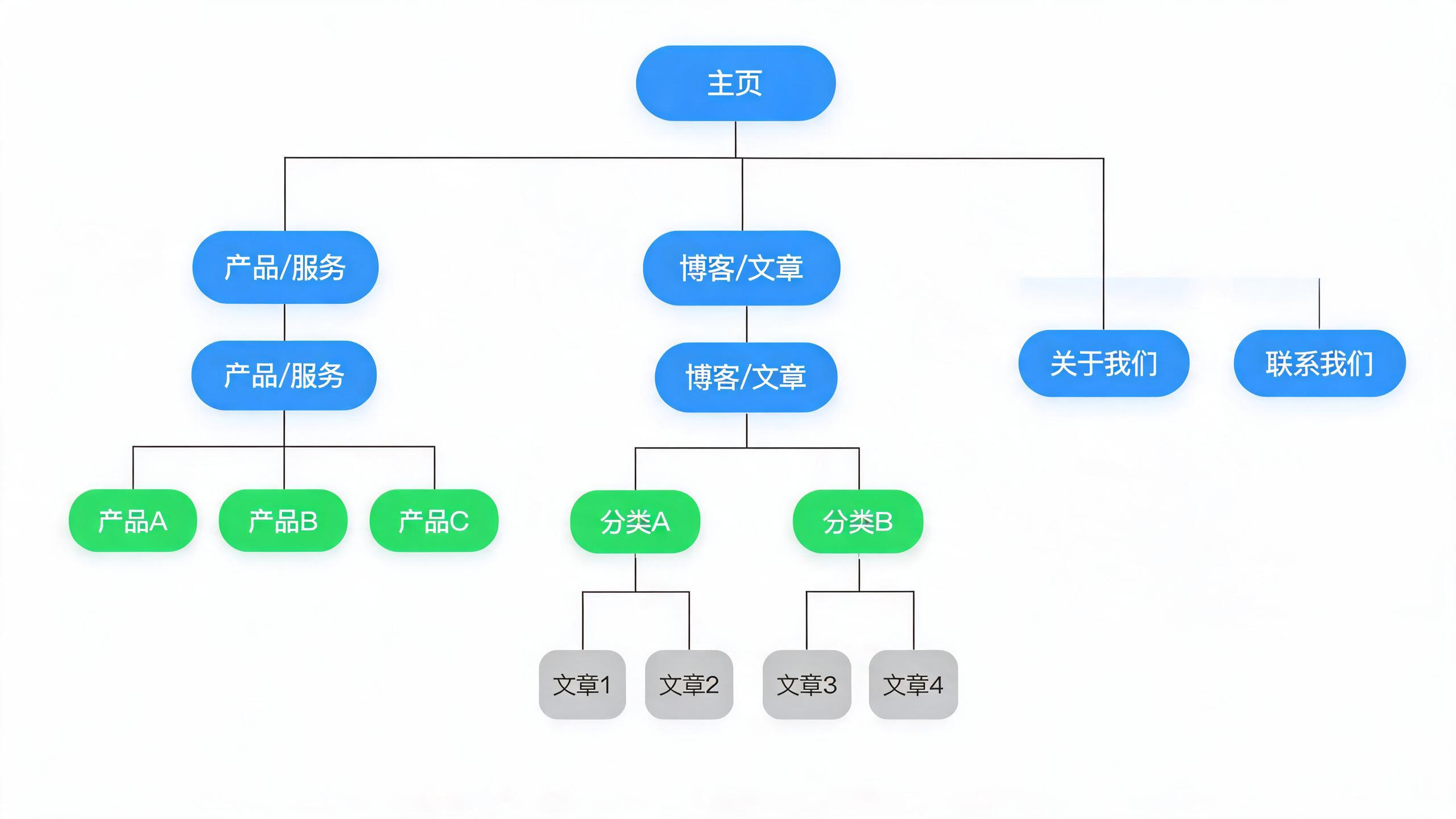
Figure: SEO-friendly site architecture hierarchy (click depth ≤ 3)
7.2 Internal Linking Optimization Tips
| Optimization | Description |
|---|---|
| Navigation menu | Place the most important pages in the main navigation |
| Breadcrumb navigation | Every inner page has breadcrumbs indicating its hierarchy |
| Related articles | Recommend related content at the bottom of articles |
| Anchor text | Use descriptive anchor text for internal links (not “click here”) |
| Orphan pages | Pages with no internal links pointing to them — find opportunities to add links |
| Click depth | Important pages should be no more than 3 clicks from the homepage |
7.3 SEO Value of Internal Links
Internal links are not just for user navigation; they serve important SEO purposes:
- Help crawlers discover pages: Crawlers discover new pages through links
- Distribute page authority: Authority flows between pages, with important pages receiving more internal links
- Boost relevance: Anchor text and surrounding content help search engines understand the target page
- Improve user experience: Users find related content more easily and stay longer
Technical SEO Audit Toolkit (For more tools, see “SEO Toolbox: 40+ Free SEO Tools Curated”)
Free Tools
| Tool | Purpose | Website |
|---|---|---|
| Google Search Console | Official search data + index management | search.google.com |
| PageSpeed Insights | Page speed testing | pagespeed.web.dev |
| Lighthouse | Comprehensive performance audit | Built into Chrome DevTools |
| Schema.org Validator | Structured data testing | validator.schema.org |
| Rich Results Test | Google rich snippet testing | search.google.com/test/rich-results |
| WebPageTest | Detailed performance analysis | webpagetest.org |
| SSL Server Test | SSL certificate testing | ssllabs.com/ssltest |
| Mobile-Friendly Test | Mobile-friendliness testing | search.google.com/test/mobile-friendly |
Paid Tools
| Tool | Purpose | Price |
|---|---|---|
| Screaming Frog | Site-wide crawler + technical audit | Free for 500 URLs, paid £149/year |
| Ahrefs Site Audit | Comprehensive SEO audit | From $99/month |
| SEMrush Site Audit | Comprehensive SEO audit | From $119.95/month |
| Sitebulb | Visual crawler audit | From $15/month |
Technical SEO Optimization ROI Analysis
Many enterprises believe that “technical SEO is the tech team’s concern, not a business issue.” In reality, technical SEO often delivers an exceptionally high ROI.
Investment vs. Return Comparison
| Optimization | Effort (person-days) | Expected Traffic Lift | Priority |
|---|---|---|---|
| HTTPS migration | 0.5–1 day | 5%–10% | 🔴 Highest |
| Image optimization | 1–2 days | 10%–20% | 🔴 Highest |
| CDN integration | 0.5–1 day | 10%–15% | 🔴 Highest |
| Structured data | 1–3 days | 10%–30% (CTR lift) | 🟡 High |
| Deep speed optimization | 3–7 days | 15%–30% | 🟡 High |
| Site architecture adjustment | 2–5 days | 10%–20% | 🟡 High |
| Mobile adaptation | 5–10 days | 20%–40% | 🟡 High |
| Complex technical refactor | 10–30 days | 30%–50%+ | 🟢 Medium |
Why Does Technical SEO Have the Highest Priority?
- One-time investment, long-term benefit: Technical optimizations, unlike content, do not require continuous updates
- Site-wide impact: A single optimization point affects every page
- Competitive moat: Many competitors have poor technical SEO
- Foundational prerequisite: Without solid technical foundations, even the best content and backlinks underperform
90-Minute Quick Audit Checklist
If time is limited, use this checklist for a quick diagnosis:
10 minutes: Basic checks
- Visit robots.txt and confirm no site-wide block
- Check whether sitemap.xml exists
- Verify HTTPS is working properly
20 minutes: Speed test
- Test the homepage with PageSpeed Insights
- Record mobile and desktop scores
- Pay attention to the three Core Web Vitals metrics
20 minutes: Indexation check
- Search
site:your-domain.comon Google to check the indexed count - Compare with the actual page count — a large gap indicates a problem
- Log into GSC and review the coverage report
20 minutes: Mobile test
- Access the website on an actual phone
- Check font size, button size, and layout
- Test with the Mobile-Friendly Test tool
20 minutes: Content accessibility
- View page source (not Inspect Element)
- Confirm important content is visible in the source
- Check whether images have alt attributes
FAQ
Q1: Will fixing technical SEO alone improve my rankings?
Technical SEO is the foundation, not the whole picture. It ensures your website doesn’t “hold itself back,” but rankings also depend on content quality, backlinks, user experience, and other factors. Put simply: perfect technical SEO doesn’t guarantee good rankings, but poor technical SEO guarantees bad rankings.
Q2: Do static websites still need technical SEO?
Yes, but the workload is much smaller. Static site generators like Hexo have inherent technical SEO advantages (fast, secure, clean structure), but you still need to configure sitemap, robots.txt, structured data, image optimization, and so on. Overall, static sites have a higher technical SEO starting point.
Q3: How long does it take to see results after technical SEO optimization?
The effects of speed optimization are immediate (user experience improves directly). The impact on rankings usually takes 2–6 weeks to materialize, as Google needs to recrawl and re-evaluate. The more competitive the keyword, the slower the results.
Q4: Do all three Core Web Vitals need to pass?
Ideally, all three should pass, but they have different priorities: LCP (Largest Contentful Paint) is the most important, with the greatest impact on user experience and rankings. If time is limited, prioritize LCP. CLS (Cumulative Layout Shift) is usually the easiest to optimize with decent returns.
Q5: Do small companies need to buy paid SEO tools?
Generally not. Google’s official free tools (Search Console, PageSpeed, Lighthouse) are sufficient to handle 80% of technical SEO work. Consider paid tools only when the SEO team has 2+ members and the website exceeds 1,000 pages.